

iPad ACTIVATION LOCK REMOVAL WITHOUT PASSWORD | Activation Lock forgot apple id and password
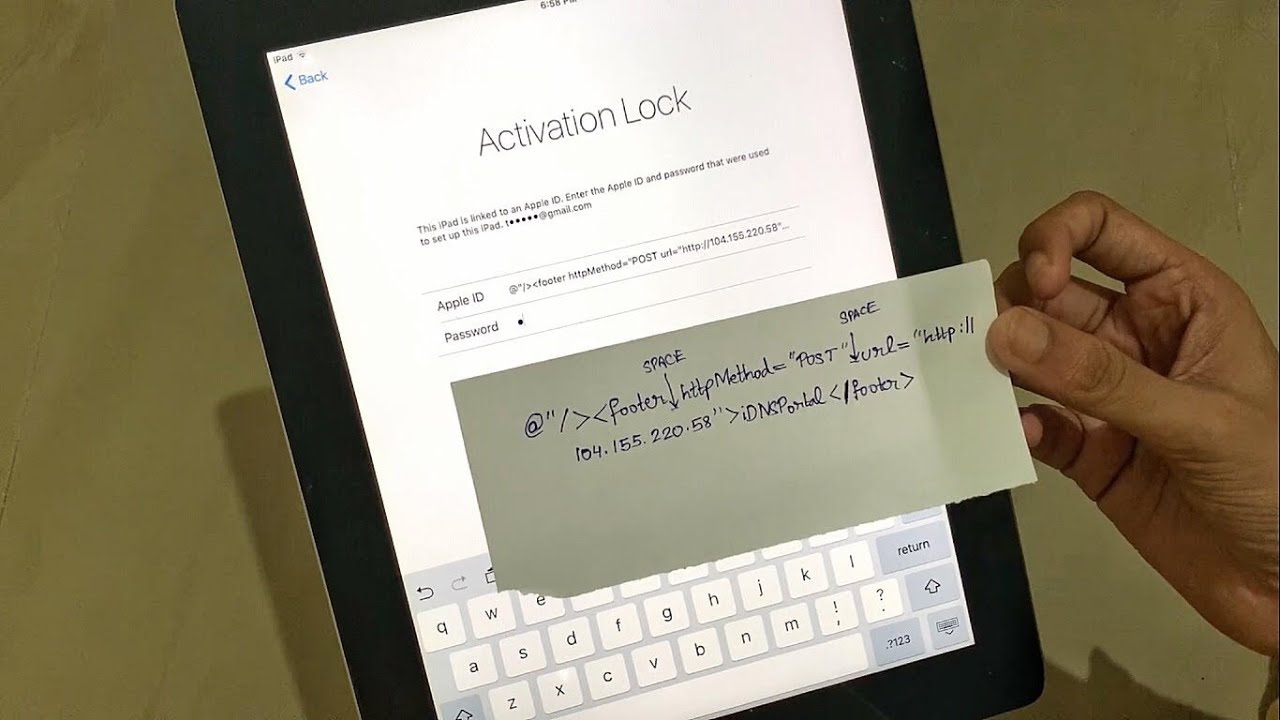
That sinking feeling. You’ve just acquired an iPad, perhaps a hand-me-down from a relative, a second-hand bargain, or even rediscovered an old device tucked away in a drawer. You power it on, excited to dive in, only to be met by a formidable screen demanding an Apple ID and password you don't possess. Welcome to the world of iPad Activation Lock – a brilliant security feature for original owners, but an impenetrable digital barrier for anyone else who forgets their credentials or buys a device without proper handover. The good news? You’re not alone in this predicament, and while it's a tough nut to crack, there are avenues to explore beyond despair.
The quest to tackle the "iPad ACTIVATION LOCK REMOVAL WITHOUT PASSWORD" is a common one, fueled by frustration and a desire to make a device usable again. This isn't just about forgetting a password; it's about reclaiming functionality from a device that feels like a very expensive paperweight. Let’s break down this challenge and explore the landscape of solutions.
Understanding the Digital Fortress: What is Activation Lock?
At its core, Activation Lock is a powerful security feature designed by Apple to protect your device and personal information in case it's lost or stolen. It's automatically enabled when you turn on Find My iPad (or Find My iPhone/Mac) and links your device to your Apple ID. This means that without the original Apple ID and password, no one can erase, reactivate, or use your device, even after a factory reset. It’s an incredibly effective anti-theft deterrent, but it can become a significant hurdle if you:
- Forgot your own Apple ID and password.
- Purchased a used iPad that the previous owner didn't properly unlink from their account.
- Received a device from someone who has passed away, and you don't have access to their credentials.
This lock persists through software updates and factory resets, making it a persistent challenge. It's essentially an electronic brick wall designed to keep unauthorized users out, and that includes those who legitimately own the hardware but lack the digital key.
The Quest for a "Free" Solution: Separating Fact from Fiction
Given the sticky nature of Activation Lock, it's no wonder that many users desperately search for "free" methods to bypass it. The internet is awash with claims and tutorials suggesting quick, no-cost fixes. However, it's crucial to approach these with a healthy dose of skepticism.
- Why "Free" is Often Misleading: Truly legitimate and safe methods that completely remove Activation Lock without the original Apple ID and password are rarely, if ever, free. Apple's security protocols are robust, and bypassing them typically involves sophisticated tools or official channels.
- The Pitfalls of Unverified Methods: Many "free" solutions found online can be risky. They might involve downloading suspicious software that could contain malware, attempting complex DNS bypasses that offer only temporary or partial access (and often only for older iOS versions), or even instructing you to perform actions that could "brick" your device, rendering it permanently unusable.
- The "Too Good to Be True" Rule: If a method promises instant, effortless, and free Activation Lock removal, especially for newer iOS versions, it's almost certainly too good to be true. Exercise extreme caution to protect your device and your personal data.
Legitimate Paths: How to Officially Remove Activation Lock
Before exploring any unofficial routes, it's essential to understand and attempt the legitimate, Apple-approved methods. These are the safest and most reliable ways to get your iPad unlocked:
- Contact the Original Owner: If you bought a used device, the absolute best solution is to reach out to the seller. They can remotely remove the device from their Apple ID via iCloud.com or by logging into their Apple ID on the device itself.
- Proof of Purchase with Apple: If you are the original owner but have forgotten your Apple ID/password, or if you purchased the device brand new from an authorized reseller and have the original receipt, Apple Support can often help. You will need to provide proof of purchase that clearly shows the device's serial number and that you are the legitimate owner. They will then process a request to remove the Activation Lock. This process can take some time but is the most secure official route.
- Using iCloud.com: If you remember the Apple ID but not the password, you can try resetting the password via Apple's iForgot service. Once you regain access to the Apple ID, you can log into iCloud.com, go to "Find iPhone," select your device, and click "Erase iPad" then "Remove from Account."
Exploring Third-Party Solutions and What to Consider
When official channels aren't an option, many users turn to third-party tools and services that claim to remove Activation Lock without the original Apple ID or password. These solutions typically work by exploiting vulnerabilities in the iOS system or by employing specialized hardware/software techniques. However, they come with significant caveats:
- Paid Services: Most reputable (or at least functional) third-party bypass tools are not free. They often require a one-time payment or a subscription. Be wary of services that ask for payment upfront without clear guarantees or positive reviews.
- Compatibility: These tools' effectiveness often depends on the iPad model and the iOS version it's running. Newer iOS versions usually have stronger security, making them harder to bypass.
-
Potential Risks:
- Warranty Void: Using third-party tools may void your Apple warranty.
- Device "Bricking": Incorrect procedures or unreliable software can damage your iPad, making it unusable.
- Privacy Concerns: You might be asked to grant software extensive permissions or connect your device to unknown servers, posing a potential privacy risk.
- Limited Functionality: Some bypass methods might leave your device with limited functionality, such as disabled cellular service or an inability to use FaceTime/iMessage.
- Temporary Bypasses: Some solutions are only temporary; the lock might reappear after a factory reset or software update.
- Research is Key: If you decide to explore this route, thoroughly research any service or software before committing. Look for recent reviews, check their success rates for your specific iPad model and iOS version, and understand the potential risks involved.
Ultimately, removing Activation Lock without the original Apple ID and password is a complex challenge. While the allure of a "free" solution is strong, legitimate and safe methods often involve working with Apple directly or, in the absence of that, carefully vetting paid third-party tools. Always prioritize caution, protect your device from further damage, and remember that prevention – ensuring a device is properly unlinked before purchase – is the best strategy.


.png)
.png)


Follow Us